 Implementing Fluent Reveal Highlight on the Web
The Fluent Design System is a design language introduced by Microsoft's design team for their own platforms. One of its most immediate, visually striking elements is Reveal Highlight: hover over a button, and a glow trails your cursor; click down, and a subtle ripple spreads across the surface.
This effect looks a lot like Material Design's Ripple, but it is significantly harder to build. Ripple only triggers on a click, whereas Reveal Highlight demands a glow that continuously tracks the cursor in real time. Keeping that glow locked to the pointer without perceptible lag was the primary challenge we had to solve.
TL;DR
We published our ready-to-use component on npm under @ax-design/reveal-highlight, with documentation hosted on our project site. It relies on CSS Typed OM, so browser compatibility might be an issue. If that doesn't bother you, feel free to drop it in directly; if it does, feel free to fork it and hack on it.
Here is the final result in action:
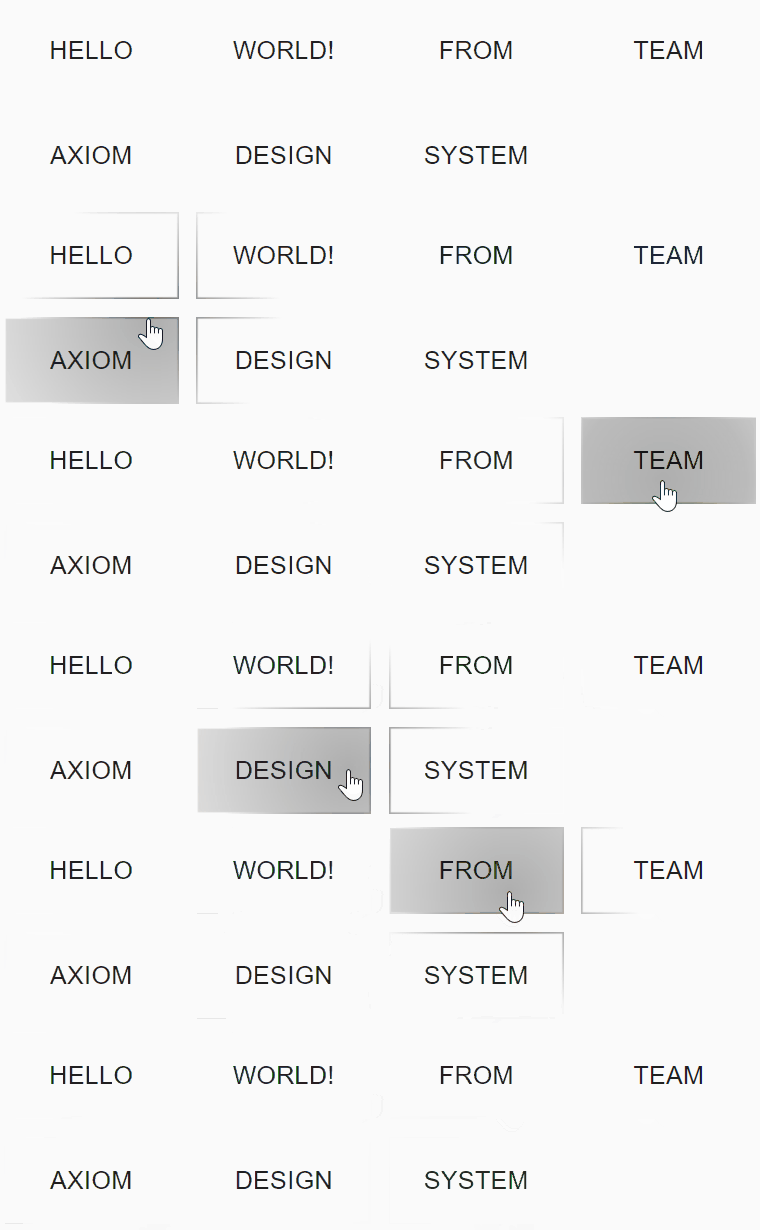
Our implementation clocks in at roughly 4 milliseconds per frame, making it the fastest web implementation available so far.
(Check out the live demo here. Note: if you are running Chromium or one of its derivatives, head over to about:flags and turn on Experimental JavaScript and Experimental Web Platform features. Otherwise, CSS Typed OM won't work, nothing will render, and it will fall back to plain elements without effects.)
Choosing the Right Tech Stack
Terminology: To avoid ambiguity in the following discussion, let's call the darker glow along the border the border glow, and the lighter illumination inside the element the container glow.
When we first tackled this effect, our initial thought was a pure DOM approach: wrap the effect inside div elements, drop in a glow image or an empty div with a CSS gradient, and move the container alongside the mouse. We ultimately abandoned this approach because the container glow background has to be transparent. To keep it transparent while masking out the border glow's center, you only have three options:
- Four separate containers (top, bottom, left, right), each holding a border glow element. Terrible performance.
- CSS Mask. Terrible browser support.
- Give up on transparency entirely, which violates the design spec (this was what Fluent-reveal-effect did).
So the raw DOM approach was out. Next, we explored SVG, since SVG masks had slightly better browser support. But that ran straight into another wall: the glow lagged behind the cursor.
The reality is that both SVG and DOM solutions suffer from layout reflows. Reading an element's position forces a reflow; updating its position forces another. Multiply that across several elements, and the page turns into a slideshow. To bypass this entirely, we decided to draw the effect on an HTML5 Canvas. The outcome was great: unless you are running on an ancient potato PC, the animation stays buttery smooth. Here is how we implemented and optimized it.
The Rendering Pipeline
The core draw cycle is fairly straightforward:
- Use
Canvas.createRadialGradientto build a gradient fill. - Align the gradient's center with the cursor position.
- Paint the border glow. At this point, your canvas only holds a spherical gradient.
- Clear the inner container area. This leaves only the border glow along the edges, keeping the center completely transparent.
- Paint the container glow.
Animation orchestration gets trickier. When you release the mouse button, the ripple animation keeps expanding for a brief window before settling. This requires an animation manager to track the playback state for each canvas:
- On
mouseup, push the canvas into the animation manager. On everyrequestAnimationFrametick, iterate through all active elements and update their canvas frames. - If the user clicks again mid-animation, reset the animation progress for that canvas.
- Once the animation finishes, remove the canvas from the manager so subsequent frames no longer repaint it.
Optimizations
Caching Gradients
I picked up this trick from Snafloda, a friend who builds game engines. Drawing circles is relatively expensive. Spherical gradients are essentially drawing concentric circles over and over, which burns through CPU cycles and drags down render times. So we chose to cache the rendered gradient as an offscreen bitmap. As long as the element's style remains unchanged, every mouse movement simply blits that cached bitmap onto the canvas.
We only cached the static hover glow rather than every frame of the ripple expansion, for two reasons:
- Real-time cursor tracking during movement has a much bigger impact on user experience, so rendering must stay blistering fast while the mouse moves.
- Users rarely drag their cursor all over the screen with the mouse held down, and caching every single frame of a ripple expansion drastically slows down component initialization.
We also considered pooling the cache globally in a single manager rather than having each component maintain its own instance, but with limited bandwidth across the team, that idea was shelved.
Coordinate mapping was another absolute headache. You have to juggle viewport coordinates, canvas coordinates, and the cached bitmap's offset all at once to figure out where to blit the pixels. It is surprisingly tricky math; anyone interested is welcome to torment themselves with the derivation (゚∀。).
In any case, this optimization gave us a massive performance boost. Huge thanks to Snafloda (´▽`).
Caching BoundingClientRect
element.getBoundingClientRect() triggers reflow, which is slow. Calling it on every frame quickly becomes a bottleneck. We initially tried caching its result and reading from that cache, but if the glowing element sat inside a scrollable container, the coordinates would drift out of sync. While we wrote the code for this optimization, we left it undocumented.
Style Management
When deciding how to manage styles, performance took priority over everything else, which led us straight to CSS Typed OM.
Traditional interop between JavaScript and the CSSOM is remarkably primitive: you just fling strings back and forth. JavaScript reads a string and parses it; JavaScript writes a style update as a string, and the CSSOM has to parse it all over again. Beyond being a performance drain, the total lack of type safety makes it error-prone. The CSS Houdini initiative introduced the CSS Typed Object Model (CSS Typed OM) to solve this. When JavaScript manipulates CSS styles, it uses explicit typed representations with units. JavaScript validates types upfront and passes structured values directly into the CSSOM, skipping string serializing and parsing entirely. This improves both performance and runtime stability. If you find this topic interesting, I might write a dedicated piece on it down the road.
Because this API is bleeding edge, browser support is patchy, and several types are still half-baked (standardization around color values was still in limbo). Still, performance was our highest priority, so we made the aggressive choice to adopt CSS Typed OM. That said, our core Reveal Highlight rendering algorithm does not strictly depend on it. Our earliest prototype was actually built in React with styles passed as component props. Later on, wanting the library to work seamlessly across any framework, we migrated from React to native Web Components, and our style management approach evolved alongside it.
Wrapping Up
This was just a quick set of field notes. If you want to dig into the implementation details, check out our source code. If you have questions, feel free to reach out via Telegram or drop me an email.
Project contributors (alphabetical, equal contributions across the board):
- Balthild Ires (Quality control, bug fixes)
- Jack Works (Web Component migration, build and release architecture)
- Losses Don (Render pipeline, performance tuning)
- UTL_1138 (Visuals, motion tuning, design language direction)
@ax-design/reveal-highlight is part of the Axiom Design System. Our goal is to extract the best elements of Fluent Design and Material Design into a coherent, performant, and elegant design language, paired with production-ready web implementations to elevate user experience across the web.