 Alice Run Project Report: An Exploration of Digital Health and Motion-Based Media
During the May Day holiday, I started tinkering with some quirky stuff again. This time, I built a motion-controlled visual novel system powered by Joy-Con controllers and PC.
This project actually began two years ago. I've played many "motion games" on the Switch, and they're all fun. However, none achieved my ideal of "controllable aerobic exercise," so I thought, why not make one myself? In fact, I had a very successful "weight loss experience" once in my life.
During a winter break in middle school, a chubby kid who couldn't do any sports successfully flattened his protruding belly and became a genuine "skinny monkey." The method was incredibly simple: run in place while watching TV, one hour a day, for a whole month. When I put on clothes at the start of the new semester, I discovered that all the "fat" on my body had disappeared.
It all started with a bet between my classmate and me at home - who would collapse first from running in place for an hour. The process wasn't tiring at all, just pure sweating. This was probably the first time in my life that exercise triggered endorphin release and gave me a sense of "happiness." Since there was no uncomfortable "gasping for breath" feeling, I stuck with it.
Motion Games
But after starting work, maintaining exercise habits became very difficult. Playing ping pong with my idiotic boss all day at the company, walking home in the evening was already exhausting. If I added high-intensity exercise, I wouldn't be able to get out of bed the next day - pure agony.
To "record" my exercise and obtain rewards through "gamification" to create a positive cycle, I spent some time completing most of the "Switch motion games" I could buy.
As an extremely picky person, after experiencing numerous "motion game" titles, I always had this feeling of not quite hitting the mark - like scratching an itch through your boot.
Fitness Boxing
This was the first fitness game I played. The game design itself wasn't too problematic - an upper body destroyer where you punch for half an hour daily, earning points and achievements.
But the biggest issue with this game was poor motion detection, especially for squatting movements. Therefore, for most players, you had to enable various "auto-detection" settings in the configuration, which was somewhat awkward.
Regarding the achievement system, it had many achievements encouraging you to "exercise more" - like accuracy count, total exercise time, total punches thrown, and even some tricky ones like "complete the game using all background music." But some settings were rather awkward.
For example, you had to select all characters, dress each character, and play enough rounds with each. While I could understand it still wanted you to exercise more, being forced to punch with characters you didn't particularly like to achieve "full achievement unlock" was somewhat uncomfortable.
Overall, the game design was good, with nice graphics and decent music selection. Most achievements have been unlocked to date, with a total usage time of 165 hours on Switch.
Ring Fit Adventure
Honestly, pretty terrible in my evaluation. This was the only fitness product among all that included resistance training (that ring), which is commendable.
But there wasn't much else to praise. While combining aerobic and strength training was a decent attempt, the fragmented experience between levels - where you need to configure drinks, upgrade skills, choose skill combinations, and select exercises during workouts - severely disrupted heart rate maintenance due to this "active participation."
In Ring Fit Adventure, all exercise behavior was entirely player-controlled. You could run slowly, slack off during running, choose only "yoga" throughout the workout, and "secretly rest" between exercises. All of this seriously affected workout effectiveness.
Finally, I was very dissatisfied with Nintendo's "gamification" design. Although the mini-games were cleverly designed, the design as an exercise game wasn't ideal, because game elements and progression related to the player's gaming skills, which was extremely unreasonable.
Completed the first playthrough, reached halfway through the second, total usage time 95 hours.
GameFit
A quite decent product. The intensity was sufficient. While Fitness Boxing mainly worked the upper body, this one included a lot of lower body exercises. You know, leg workouts are always the most painful, which is why there are so many "train chest, skip legs" people.
Unlike aerobic boxing, this game had stronger control over the trainer's heart rate. With Fitness Boxing, unless you really deliberately punched hard, heart rate had a pretty low ceiling. Unfortunately, after you got used to it and movements became automatic, the range of motion would easily become smaller.
But GameFit mainly involved lower body movement, with almost no room for "reduced range of motion," so every workout experience was ideal.
There were some issues though - the movement design was somewhat "overly difficult," requiring simultaneous upper and lower body left-right coordination, often making me "cross-step," leaving me completely confused after each session.
Also, its difficulty marking for each movement was somewhat inaccurate. Some movements would obviously make you want to die from exhaustion, but would be randomly programmed into the same day's workout plan. After finishing, you'd be so tired you'd want to hug the toilet and vomit (really nauseous, not just a figure of speech). Some days were mysteriously easy with no feeling even at the end.
Finally, its strength training felt like filler because it lacked resistance, making the difficulty obviously lower.
However, since heart rate maintenance was decent in terms of atmosphere, I gave it high marks.
Current progress: collected all character outfits. Since I bought it recently, total usage time is only 40 hours.
Let's Get Fit
This game was obviously designed for professional exercise players, with an extremely steep difficulty curve that left you either "feeling nothing" or "exhausted to death."
The visual design was ridiculously tacky, and the music selection was very awkward. The only commendable thing was that it could provide feedback on your movement trajectory rather than feedback per "single movement," allowing better understanding of what went wrong. But due to insufficient tutorials, you might never know what you did poorly to not get a high rating.
This design approach obviously targeting "professional players" had a major problem: why would people already good at exercise need a "motion game" to help maintain habits or improve? I still haven't figured out the answer to this question.
Combined with significant program stability issues - frequent crashes and slow loading speeds - I abandoned it after playing for a while.
Total usage time: 10 hours.
Family Trainer
Although someone on Bilibili who specializes in reviews gave it low marks, I had a very good impression of it. Setting aside those completely ineffective "upper body exercises," the running and jumping-based exercises were all very effective. "10-minute slow jog" and "jump rope" were my two favorite activities. Throughout the workout, heart rate could be maintained at high levels.
However, there were some regrettable aspects. For example, each super slow jog could only last 10 minutes, while an ideal workout should last at least 40 minutes. Also, the jump rope motion detection was indeed somewhat inaccurate, and every failure would reset the rope speed to the initial level, significantly reducing challenge difficulty.
I just bought this recently. Although I really like it but haven't played long, I got a bronze medal, 4 hours.
My Ideal Training Program
In my mind, a good training program should consider several dimensions:
- Visual and audio experience: At least modern content style, doesn't need to be eye-catching but at least shouldn't be painful to look at. Music selection is optional, but if included, shouldn't be embarrassing.
- Exercise intensity: Whether the game can continuously maintain heart rate at a high level during exercise, which is crucial for energy burning and fitness improvement.
- Non-awkward gamification: At least the "game" difficulty should relate to exercise intensity rather than other "game operation" difficulties.
- "Control direction": For an exercise product, the game should "control you" - what movements to do, at what rhythm, how many times, for how long, to achieve expected exercise effects. Provide incentives if achieved, feedback if not, reflected in scoring.
The products I experienced above were somewhat unsatisfactory in these dimensions, but considering I can code, why not make one myself? So I started planning something.
Based on my successful middle school weight loss experience, I decided to focus current development efforts on "super slow jogging." In fact, just doing this well could create significant value.
Super Slow Jogging
In exercise terminology, this method is called "super slow jogging." But this term only became popular in recent years - stumbling upon this method back then was pure luck.
Literally, super slow jogging means running at an extremely slow pace - either running in place indoors or outdoors at walking speed (like a street fool). It aims for low intensity and speed. This exercise is particularly suitable for those whose bodies aren't yet prepared for exercise but want to start changing their physical condition.
The advantage of super slow jogging lies in its high energy consumption efficiency and low negative experience. For those unable to stick with running, the biggest deterrent might be gasping, breathlessness, and needing to specifically allocate time to go out daily.
This is like UX design - one more point of friction significantly reduces user success rates at the final step. Super slow jogging as an exercise largely eliminates these "negative motivators." You can exercise indoors in place, running while watching shows or sports games.
The key to super slow jogging is stable rhythm. The most effective pace is three steps per second, or 180 steps per minute, achieving optimal results and most comfortable running experience. If you commute to work daily, you can also run on the street at near-walking speed. Same time, double the energy consumption without being very tiring - practically free money.
Currently, the only systematic book introducing "super slow jogging" I could find was Hiroaki Tanaka's "スロージョギングで人生が変わる" (Life Changes with Slow Jogging). Since I can't read Japanese, I used GPT to translate the entire book. While not achieving "faithfulness, expressiveness, and elegance," reading the gist was no problem.
My evaluation of this book isn't very high - the discussion of scientific principles has a pseudo-scientific flavor, but the practical exercise aspects are fine and won't cause exercise injuries. If you're interested in this topic, it's still worth reading since there aren't other books available.
Two Years Ago's Failure and Today's Continuation
Back then, I started this project because I wanted to record super slow jogging. However, due to various technical issues, project progress wasn't smooth.
Initial scene setup went fairly smoothly, but sensor data processing became problematic. As a former "neuroscience player," seeing this kind of data naturally brought thoughts of "filters," "Fourier transforms," and other fancy operations. But signal processing in the JavaScript ecosystem was a mess - worse than Julia's signal processing ecosystem. I tried various libraries but couldn't process the data, gave up after several days to play with other things.
But you know, as a picky person, when dissatisfied with existing products, you inevitably get the urge to reinvent the wheel. Coincidentally, two years later, I finally had access to GPT4, and things started turning around.
The conversation began "heuristically" - I first asked GPT to introduce "Ring Fit Adventure." It explained the game content in detail. I further inquired how running was implemented in Ring Fit, particularly step counting. GPT told me it could be achieved by setting a simple threshold - when acceleration exceeded this threshold, it would simulate leg lifting; when acceleration dropped, it would simulate leg landing.
I thought this method was good, so I asked if there were better solutions. GPT suggested designing a state machine using high and low points to determine steps, making the overall system more stable and avoiding false steps.
During the conversation, GPT mentioned I could use filters to remove high-frequency noise and provided a filtering method I'd never seen before. By smoothing the relationship between old and new data, reducing old data weight while increasing new data weight, thus filtering high-frequency noise.
"Baby, wild!" In academia, I'd need a band-pass filter at minimum, sometimes even wavelets when things got crazy. This works too? Isn't this just Lerp? Oh wait, Lerp is essentially filtering too. But back then, signal smoothing required maintaining arrays and windows - this approach doesn't even need arrays.
Industrial practices indeed differ greatly from research approaches. Impressive, truly impressive.
Since we'd gotten this far, couldn't I ask it to directly write a TypeScript implementation? Surprisingly, the generated code was highly usable. I added more requirements, asking it to generate code integrated with existing Web HID API, and things started working!
Damn! This thing worked! I spent days tinkering back then without achieving anything. Now GPT got it done - I almost went to read motion capture papers back then.
But later there was a mishap. My GEM12 lacked a Bluetooth antenna, so Bluetooth signal was very poor - not only severe packet loss but also non-uniform data processing, often missing steps. In regular products, you might smooth things out and calculate steps, making characters move forward at fixed speed. But not me - I'm extremely particular about that realistic feeling. Character behavior must be precise to each step - one step forward means the scene moves forward a bit.
To handle this, I exported data to R for ggplot visualization and endless parameter tuning. Each adjustment required actual testing to see if effects were good, and I was completely exhausted that evening.
Later, following the "good tools make good work" principle, I wrote a simple debugger, only to discover the signal inconsistency issue. Bought a Bluetooth adapter with antenna the next day and finally resolved things.
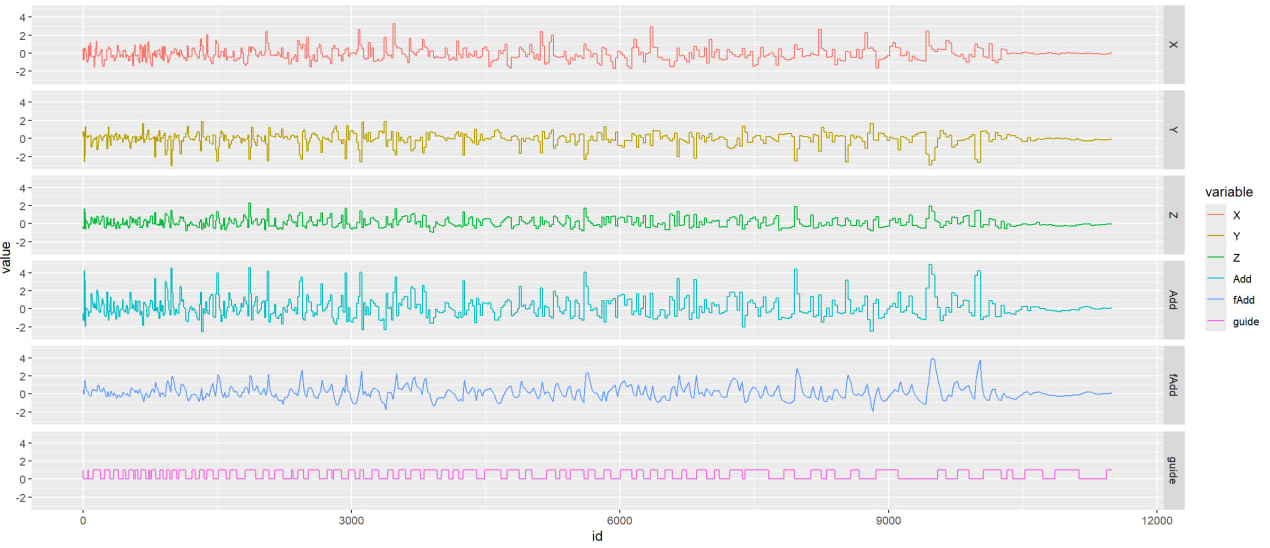
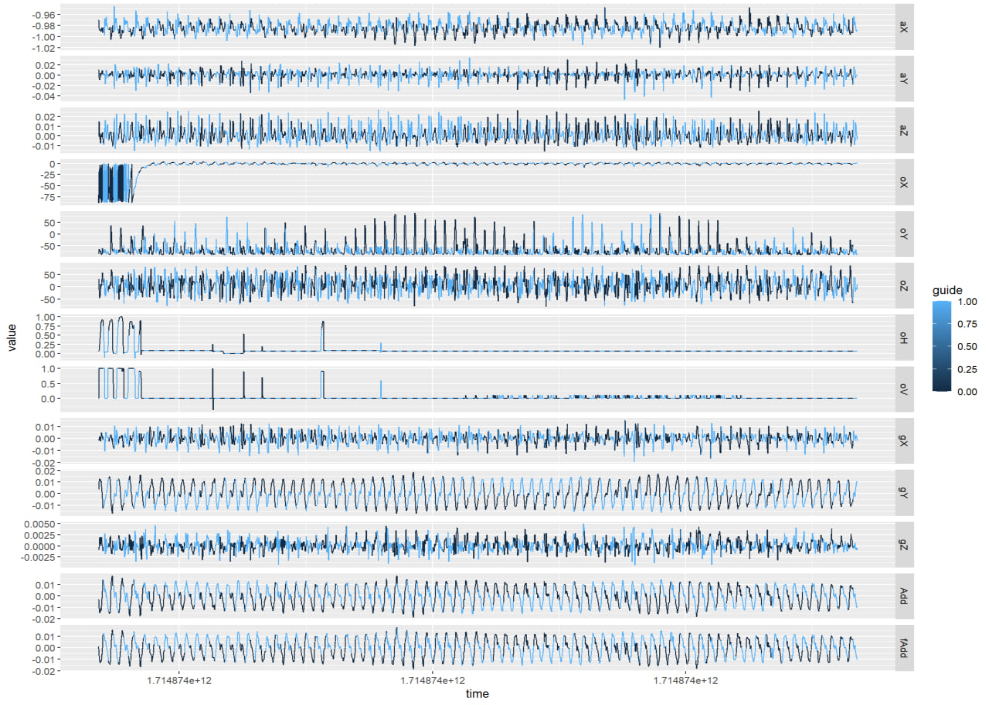
Seeing clean, beautiful signals that didn't even need filtering, tears of unwillingness flowed from my eyes.
Damn, I wasted an entire evening for such an absurd reason...
Computer Graphics and Technical Art!
Besides these absurd things, the rest was normal Technical Art territory.
Day 0
This part was pre-holiday preparation: ground design.
Drawing on experience from modifying "Old Wang Goes Down the Mountain" interactions during basic operations, I quickly created an infinitely wide random ground with automatic chunk loading and unloading during character running.
This is a common design, but it has two problems: if the plane is flat, resources needed to fill the entire view increase with distance. While chunk loading/unloading is possible, it brings visual problems like object flickering. Anyone who's played Minecraft knows that setting render distance too close creates obvious visual jumps during chunk loading.
Of course, LOD (Level of Detail) processing could be used, reducing distant object detail to improve rendering efficiency. But... is it necessary to be so hard on myself... I only have a short holiday... I'd rather do content-related things...
Of course, there's a more elegant solution - Animal Crossing. Animal Crossing uses cylindrical world design where the cylinder rolls as players move along depth, greatly reducing content needed in view.
I tried this method but found the horizon became very obvious with strange effects - no longer like real space, with very narrow scene depth. However, stretching the cylinder three times into an ellipse made the scene normal again.
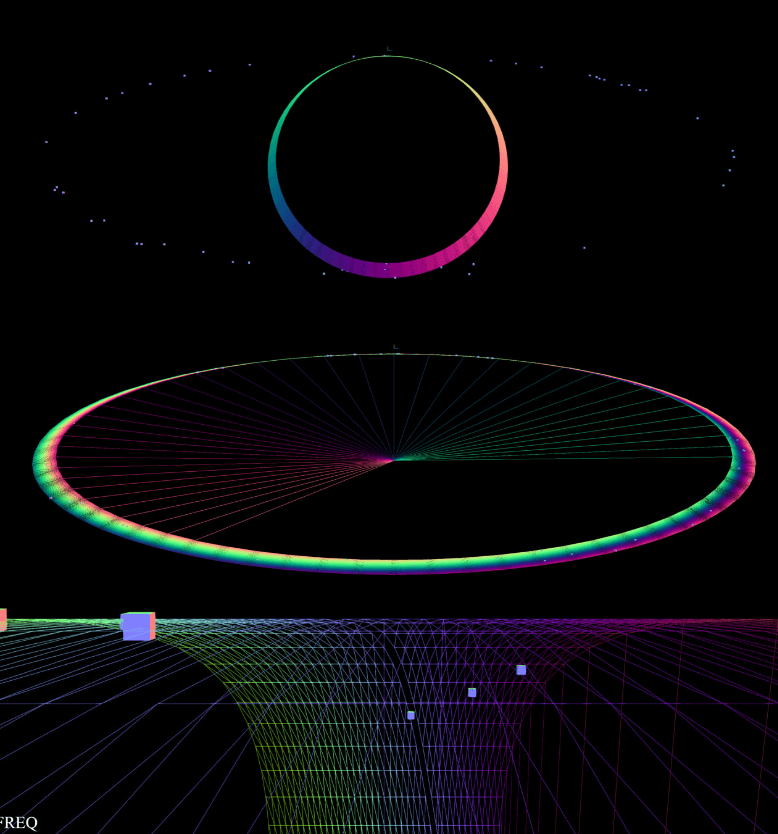
The squares in the scene are placeholders for flowers and grass. At this point, scene elements could already move forward following the trainer's steps.
Day 1
In my mind, the scene should be a vast prairie with trees and flowers, where trainers could run freely on this infinitely extending grassland.
If there were many objects, you couldn't use THREE to draw lots of individual grass and send them to GPU, because too many Draw Calls would cause lag. The non-lagging approach exists - instancing - but requires writing Shaders.
Writing Shaders has always been something I found difficult in game development. Back during basic operations, facing complex Shaders, I was afraid to touch them due to not understanding the mathematical principles - I'm a coward after all.
But this time, I had GPT, plus online tutorials teaching how to use Shaders to draw prairies, so I jumped in.
Although the process was chaotic and tutorial/demo projects weren't detailed, the workflow was clear, so I hand-wrote it based on provided ideas and reference code.
Day one mainly involved familiarizing with APIs and awakening computer graphics knowledge I'd seen but never used.
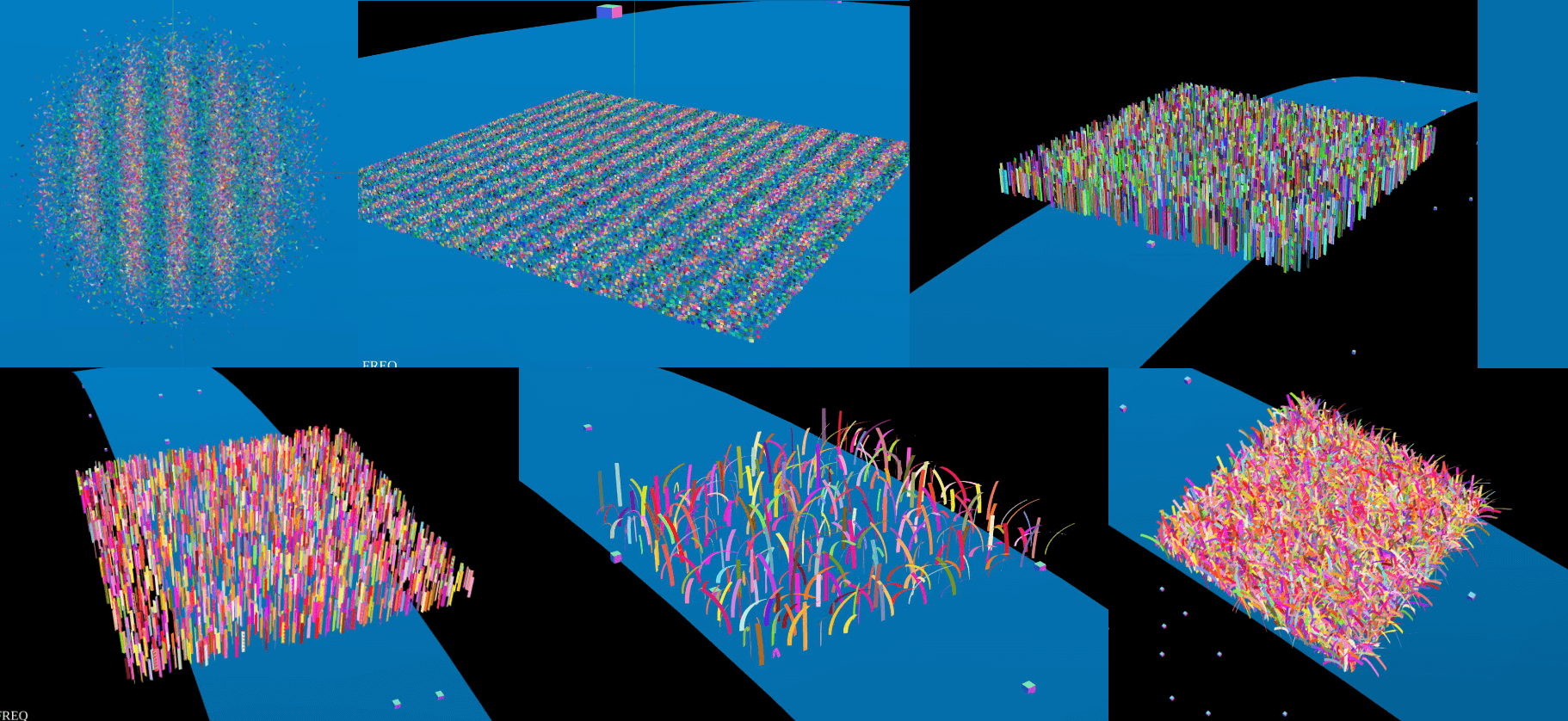
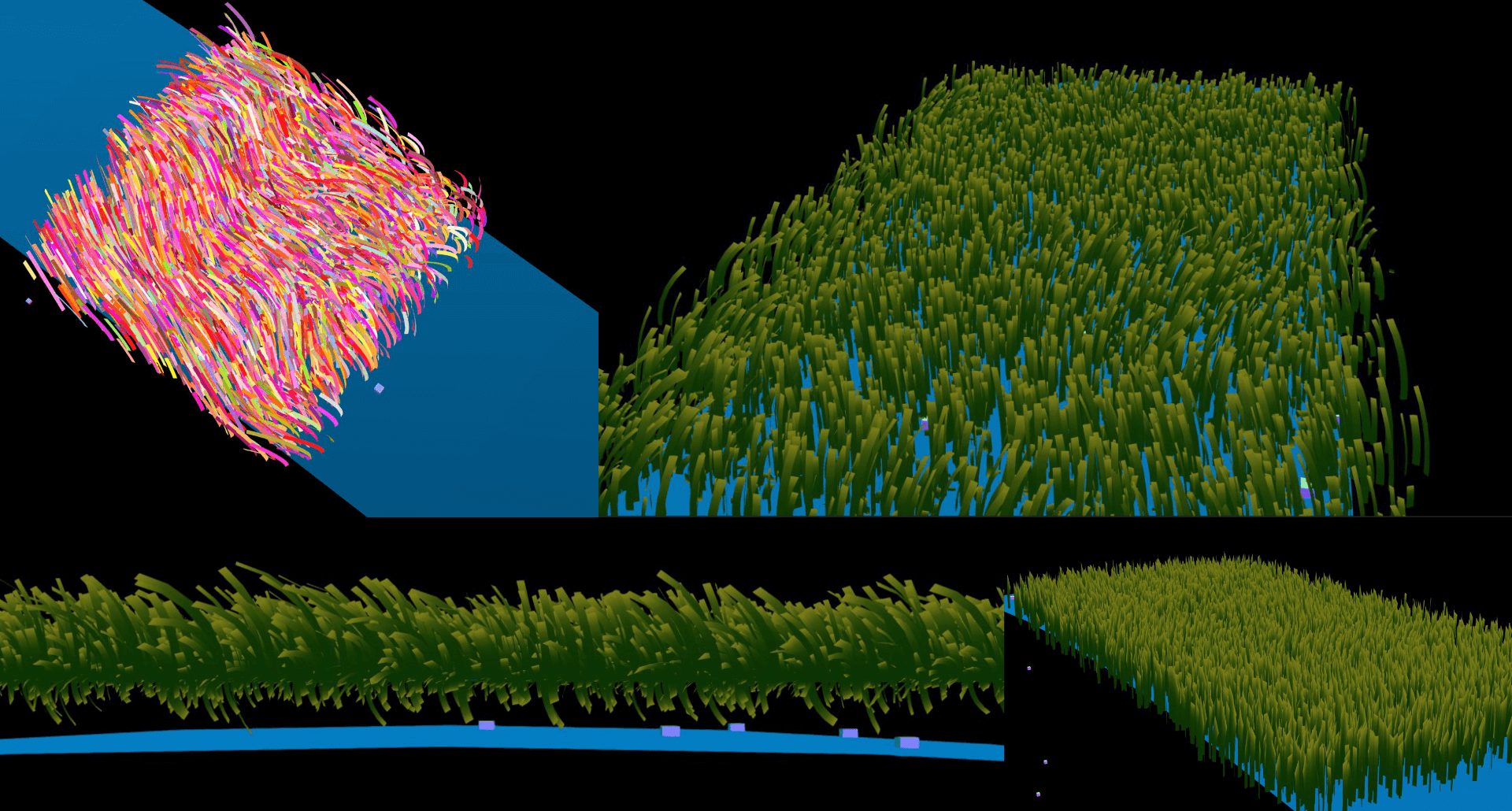
First step: copy THREE's official Buffer Geometry example, then gradually modify it. Turn flying triangles into squares, then squares into rectangles. Finally, determine rotation angle based on each vertex's y-axis coordinate - higher points get larger rotation angles, making grass bend down.
I'd forgotten most hastily-reviewed knowledge, like needing to use indices to connect vertices into planes after defining them. During this period, I basically frantically asked GPT questions. If it were a physically explosive person, I'd probably have driven them crazy. But GPT has no temper - great question-and-answer rhythm. I just described symptoms, provided code and logs, and it would tell me the next steps, even for very basic questions.
Day 2
Day two mainly made grass move. At this point, I clearly felt that when debugging wind direction or more complex things, ChatGPT's help was limited. Here, engineer's technical intuition and experience were obviously more useful.
Adjust bending parameters, use noise to generate a vector field, make grass bend along patterns rather than randomly like toilet brushes, pass timestamps as uniforms to shaders, create time-related noise, weight bending degree and direction with random vectors, and things were done.
Things looked simple, but matrix operation order matters. Wrong operation order caused grass to bend below the horizon, turning the entire grassland into a feather duster. Friends even praised me - "Your feather duster looks so realistic!"
Finally adjusted grass shape to pointed tips, completing day two's first task.
Day 3
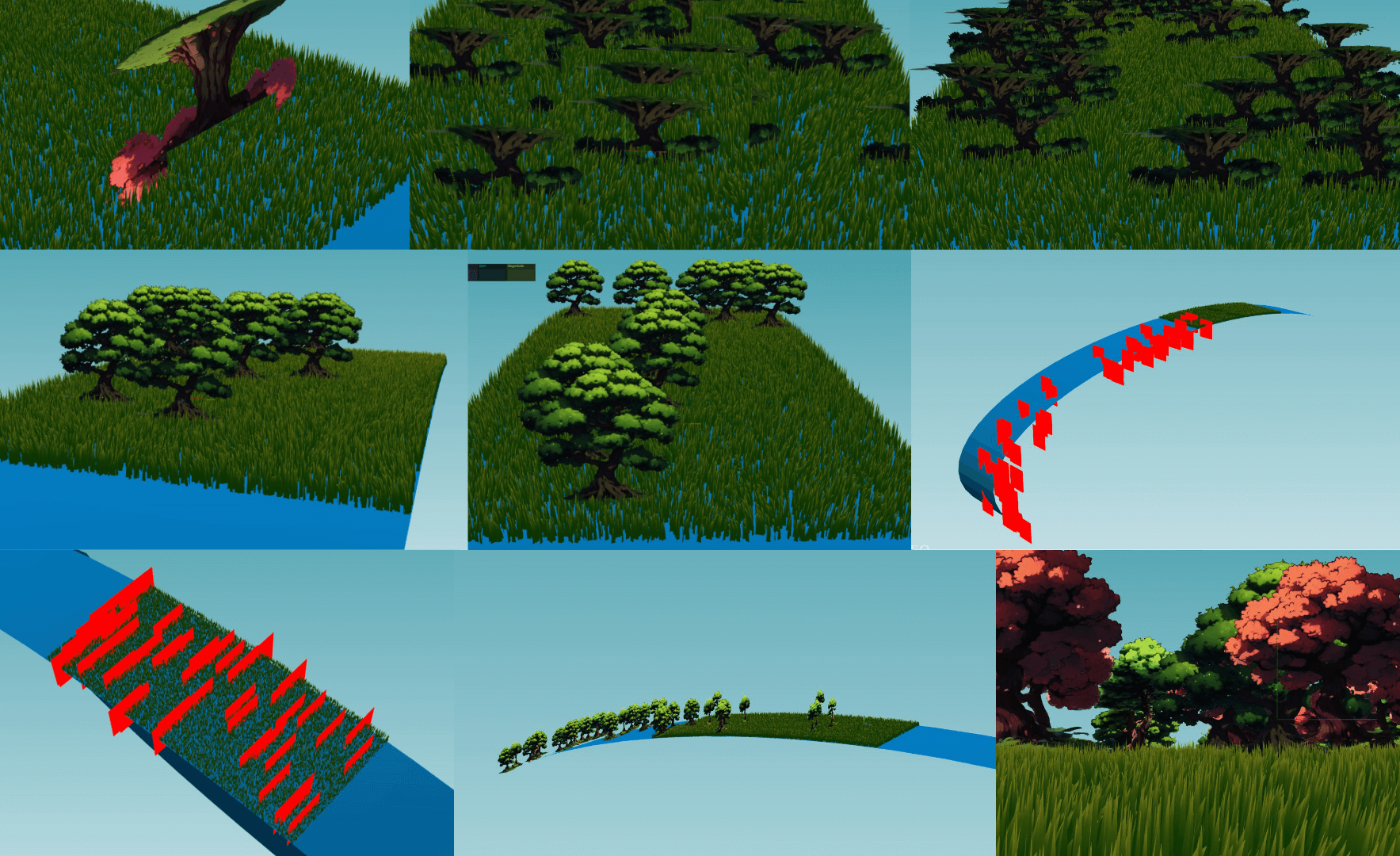
Considering that placing large numbers of 3D models would inevitably create performance disasters, I decided to directly use plane textures and treat it as a "visual style that reduces development workload." Main reference was Don't Starve. But obviously I implemented something completely different.
Used Stable Diffusion API to generate some anime-style trees, then fed them to a very magical background removal website. I call this site magical because it's entirely WebGPU-driven, running background removal models locally, and it's free - truly benevolent.
After these simplest steps, real trouble began. The first problem was high-resolution textures. Due to limited user VRAM, we usually can't use very high-resolution textures, or textures plus mipmaps would directly explode VRAM.
To handle this, Basis format textures were needed, but this compression tool was very mystical (mainly due to my inexperience). Many parameters needed to be configured, like using -flipY to flip textures during generation, or you'd get terrifying "upside-down growing forests." Also, it would automatically remap color space from sRGB to Linear, but THREE would read textures as sRGB, making rendering very weird.
Anyway, I spent a long time adjusting parameters before getting textures sorted.
Another example: the famous rasterization problem of transparency. If you've played with THREE.js, you'd definitely remember transparency issues. Adding instancing makes problems more complex. Due to this issue, THREE officially never added transparency support for instancing.
It's not possible, mainly because if that was allowed the first thing people bump into is that the order in which transparent objects get renderer is incorrect.
mrdoob, 2020
Not adding opacity support doesn't solve problems - transparent textures still fail, ridiculous—
After much struggle, first tried turning off depthWrite, but Z-axis depth had issues. Later GPT gave me a trick: discard transparent pixels during rendering.
if (textureColor.a < 0.99) discard;
Praise GPT.
Finally, limited rendering area using modulo operations so trees only rendered within visible range, avoiding wasted computational resources. Added more texture varieties, and day three was complete.
(Oh, the signal debugging exhaustion I mentioned earlier also happened this day)
Day 4 ~ Day 5
Last two days mainly added GUI. Writing GUI with CSS/HTML, doing route management, etc., was obviously more tedious and less rewarding than debugging WebGL.
First established basic design specifications: visually frosted glass, gradient bright thin borders, Raleway font, plus basic component design styles and sound experience.
Then added performance parameters: friends said netbooks struggled with WebGL rendering, so added options for adjusting grass quantity and screen resolution. Since some friends preferred retro styles, added a "pixelated style" toggle specifically for low-resolution rendering.
The sound experience here was something I really loved - pressing that switch produced a very crisp, magical "ding—" sound, instantly transforming the screen to retro style. The entire transformation experience was very full (might also be because I really love pixel art style so I'm being dramatic).
Finally, added a theme system because I wanted screen style to serve as pace indication for trainers - if the screen became gloomy, you should run faster.
What I was most proud of here was using Material Design's HCT color space for gradient animations, making color transitions very beautiful. If you play Story Mode, this animation plays around twenty-something minutes.
Opening the debugger and typing themeId.value = 'dark' and themeId.value = 'clear' can also manually switch themes (at least I haven't removed the debug switch yet).
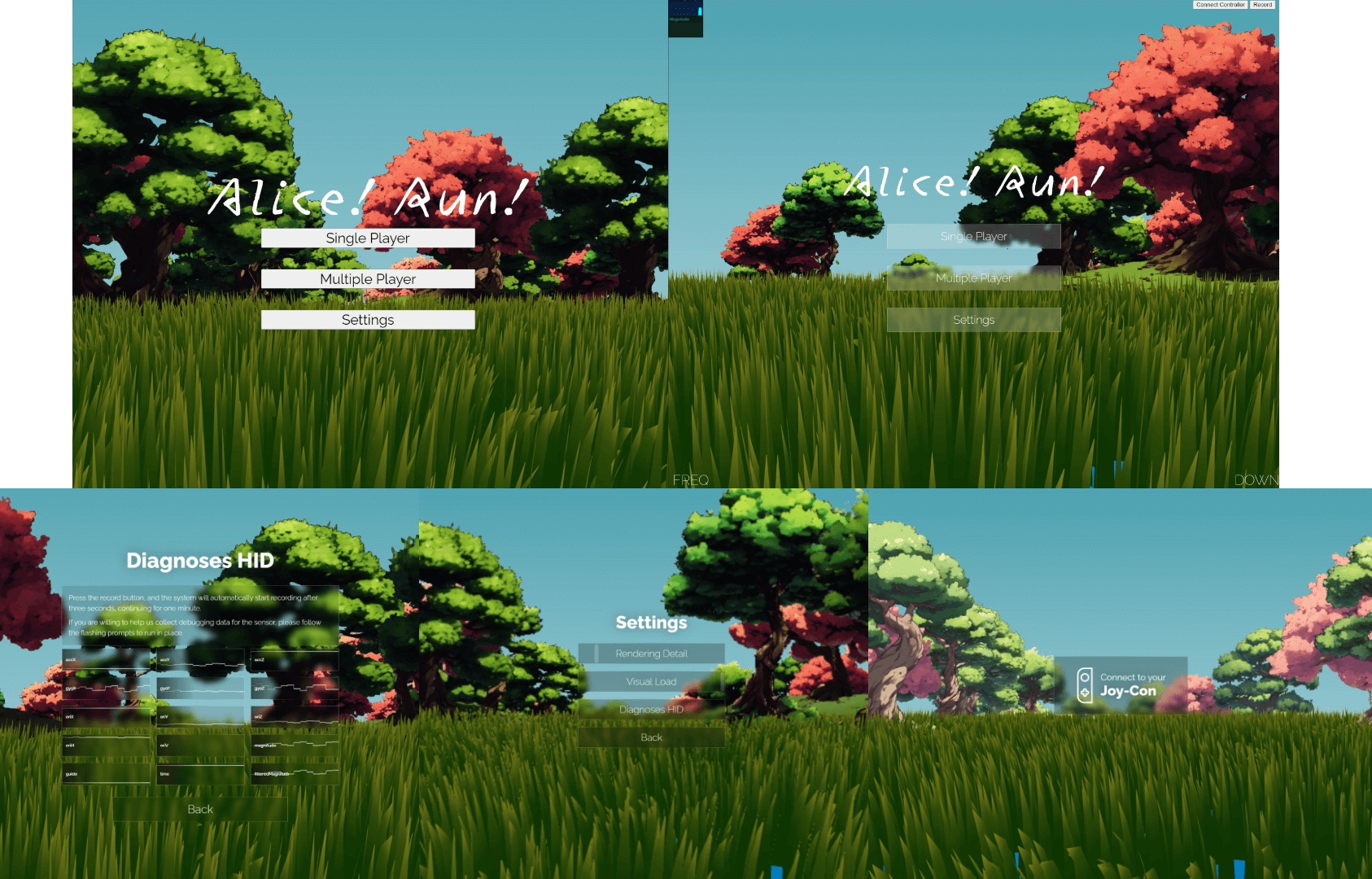
Looking at the image, you might notice text readability wasn't great initially, but the basic approach while developing was "solve existence before solving quality" - establish rough component appearance first, then fine-tune specific parameters later.
By day five, everything was quite usable. The debugger and color space fixes I mentioned were also done this day.
At this point, all basic project infrastructure was complete, and the May Day holiday was over.
Facing Real Business Logic
Day 6 ~ Day 10
Formally started handling story mode. Originally thought that with basic operations experience, simple timeline functionality shouldn't be complex, but things were more complicated than imagined.
Initial event definitions were simple, similar to cryptography project routines. The first script was written awkwardly but produced results. Just when audio was finished and I was about to start media playback integration, I realized big trouble was coming.
That period was almost continuous all-nighters, daily fixing incomplete refactoring in the Phonograph library.
First, some background: playing audio in browsers has always been troublesome. Chrome requires users to interact with pages at least once before playing audio, Safari requires interaction with each element and must be synchronous. Firefox desktop and mobile have different restriction policies, making audio playback very complex.
To address these issues, we can use AudioContext API, originally designed for "web piano" applications. The sound generation process itself isn't restricted by permission models - just activate Context in synchronous call stack.
While this solution works, it decodes all audio into PCM format in memory, potentially causing memory explosions when playing long audio. Rich Harris proposed a solution: break MP3 file frames apart, create data streams, feed chunks to AudioContext piece by piece. This library is called Phonograph.
If you've seen this library's source code, you'd understand that when Rich Harris wrote it, he wasn't particularly good at architecture - far inferior to Svelte and Rollup's engineering quality. The entire library had many problems. Limited by the era, Promises weren't widely used yet, everything was handled through Event Bus, making business logic very scattered. Audio unpacking, downloading, and playback management were mixed together, making the library's logic very unclear. Adding functionality or fixing bugs became very difficult - fix one bug, several new ones would emerge.
I challenged this library a year ago, wanting to clean up the entire architecture, but during disassembly, many problems emerged, and several features that were originally bugs stacked together got scattered. After several cycles of abandoning and picking up, my mental state couldn't handle it anymore and I finally put it down. But history is a wheel - unfilled holes eventually come back to find you. Now I needed audio playback again, so this fourth all-nighter explosion occurred.
Although unpacking and playback still had coupling, file downloading and MP3 format-specific processing logic were completely separated, providing space for adding new format support later.
Overall, the refactoring work involved removing event-based logic mechanisms and replacing them with Promise-based asynchronous programming models.
Many annoying problems appeared after refactoring: incorrect audio timing, failed initial unpacking processes, file bloat during decoding when network speed wasn't fast enough, and DeMux process freezing.
Initially, I was truly desperate - no amount of console logging or breakpoint debugging could clarify what problems occurred. Later, following the "good tools make good work" principle, I displayed the entire binary parsing process on DOM, tokenizing bit by bit, finally discovering many stupid mistakes made during refactoring.
But finally, this great historical achievement was completed. Since I couldn't really understand what Rich Harris wrote back then, I spent some time using GPT to organize code documentation and sort through existing business logic. I can only say that for ADHD patients with limited working memory capacity, this really saved many brain cells. Specifically, it could organize very complex, lengthy business processes into lists - I didn't need to play connect-the-dots in my head, just troubleshoot against its output documentation. This was a very nice debugging experience.
Day 11 ~ Day 12
The entire weekend allowed for large blocks of time on new core mechanisms. The most important progress these two days was implementing the pace bar.
This thing looked simple but was actually very annoying to implement. CSS gradient syntax is quite perverted and torturous to write. I spent the entire Saturday doing nothing but writing gradient rules for this pace bar.
The pace bar design was roughly this: a vertical slider with gradient fade-outs on both sides, middle indicator representing current pace position. The slider would mark red areas showing what range the trainer's pace should reach. Once pace fell into red range, "health loss" would begin. Red areas might be above (limiting maximum speed) or below (limiting minimum speed).
The entire slider was implemented with one complete CSS gradient. The "gradient fade-out" requirement on both sides made syntax very complex. If the red pace marking area was stuck in the gradient middle, conditional logic changes were needed for gradient rendering.
After a full day of being tortured by Gradient syntax, the thing was complete. The main reason for "low efficiency" was unfamiliarity with CSS Gradient syntax, plus initially hand-crafting gradient strings for experiments without any encapsulation - ugly code. To make code more elegant, I tried several approaches back and forth, finally encapsulating it nicely, which was very time-consuming.
Day two bound logic to the pace bar. Created lots of health deduction logic and wrote a new shader that adds horizontal random shake glitch effects to the entire screen during health loss.
Although ready-made shaders could be used, I felt official implementations were too complex - flashing and jumping, uncomfortable to watch, possibly causing photosensitive epilepsy (reference Porygon incident). I only wanted simple horizontal line shake effects.
How could I possibly write post-processing Shaders (?), so I fed GPT the official Copy Shader template and requirements. GPT gave me a roughly usable version. While it had some bugs, core functionality was implemented. I made simple modifications on top - like adjusting uniforms and glitch rules - and got the effect.
Praise GPT.
The rest was connecting various post-processing effects like color adjustment, noise addition, vignetting, etc. Bound these to health bar values - if you entered too low or high speeds, according to story design, health loss would begin. More health lost meant the screen would become old movie style, vignette would get darker, visible area would shrink.

If speed was insufficient, screen would shake, Joy-Con would vibrate, screen health and pace bars would turn red simultaneously, warning users.
But I felt this part wasn't enough - Joy-Con vibration was barely noticeable, probably needed specific frequency and intensity adjustments.
Also, during actual testing after 20+ minutes, discovered severe lag due to cache leaks. Considering calculating trigonometric functions shouldn't need caching, removed this logic block, completing the first full story mode test.
Friends participating in testing felt step detection algorithm became sluggish when running too fast, so added a "Sensitivity" option to lower detection sensitivity for easier triggering. Of course, this might cause detecting too many steps at once, but it's entirely personal preference.
Day 13 ~ Day 16
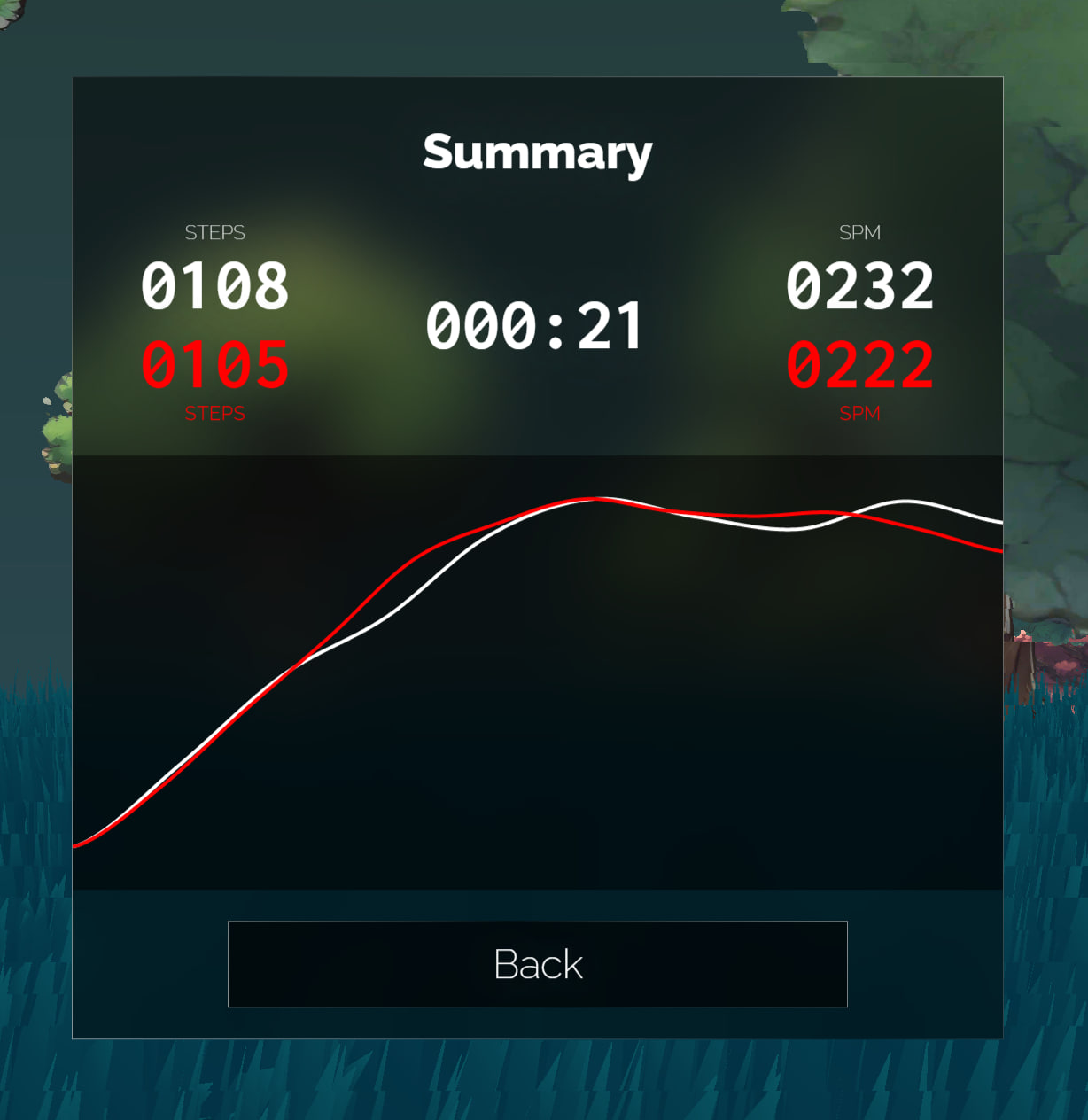
Core development task these days was exercise statistics. Training interface's bottom-left corner got a "Finish" button. Clicking it would stop timing and display various statistics including SPM (Steps Per Minute) and exercise time.
Since it's running in place, it's hard to calculate how many "meters" users "ran," so using SPM as an indicator was a relatively intuitive, appropriate choice. Height data could be used for conversion, but this involves much exercise science knowledge - not something to do now, so abandoned.
To visualize the entire exercise process data, I created a glowing curve animation effect. My description was "like fireflies flying while trailing fluorescent poop effects," which successfully generated lots of grass from friends.
Another interesting point: when I used this program for training, I also enabled Fitbit watch exercise recording. The watch calculated total steps as 6000+, but Alice Run calculated total steps as 9000+. This shows that using phones or wearable devices for step counting isn't as accurate as directly binding to thighs, and this accuracy is very necessary. Because every step taken on screen synchronizes with the real trainer - if you run one step but the character doesn't, it creates significant frustration. So the need to "use phone as sensor for step statistics" was shelved.
During this period, I also created an image transition feature (but ultimately didn't implement it). In my mind, when screen colors changed, trees on grass should also change accordingly. For example, in cold scenes, trees should preferably be blue with frost, better matching overall background colors.
With this idea, I researched many implementations and tutorials for image transition animations using THREE, finding a method most ideal in my mind: images become point clouds, scatter to the sky while changing color, then converge back into new images. Like sprinkling sand into water.

Found implementations had two types: one breaking images into numerous triangles, then using libraries for animation. I rejected this solution because my program really has many trees - if made into particle effects, triangle count would definitely explode with almost no optimization space. Plus the example project used very old libraries no longer supported by modern THREE (yes, THREE frequently breaks and doesn't follow semantic versioning), and they used GASP library with really unfavorable licensing, so this solution was shelved.
Another solution was point clouds. But current web point cloud visual effects assume fixed camera viewpoints. Once people get closer to point clouds, gaps appear between points, which is definitely unacceptable. Also, whether rendering burden would be too heavy when handling massive vertices needed consideration.
My final approach was turning one plane into several planes. When animation starts playing, calculate which plane this point is closest to, then render images to this plane, discard pixels not on this plane without rendering.

The final result had good three-dimensional feel, but the noise function used had poor performance, requiring noise baking into textures or GPU pressure would be too high. Combined with previous tree rendering design inadequacies - choosing to discard transparent pixels for Z-axis control broke rendering pipeline optimization - Z-axis sorting optimization should be properly redone.
These two things combined had considerable development costs, and the entire project's "enthusiasm burn level" had basically peaked. Considering time and psychological costs, this requirement was temporarily pushed down. If community feedback on the project is good later, I'll do it; if not, I won't (flop).

Finally, a pretty cool thing: story selection interface.
When mouse swipes left, the list slides right, giving a feeling of "list crashing toward you." This design suits cases where list length exceeds screen width but you don't want click-and-drag. Honestly not easy to implement - I wanted to die while calculating formulas. GPT couldn't provide correct formulas either, so I spent a long time adjusting. Fortunately, the final result was good.
Day 17 ~ Day 21
Routing adjustment, multi-story selection routing support.
Also implemented multiplayer mode. Bottom-right corner of screen got a button for connecting second controller, allowing another trainer to join running with you. If you have no friends but still want to pitifully play together, right-click the 2P button to activate virtual friend robot mode. It will run with you, even pretending to go fast and slow, making you feel like you're 18 running with your significant other in the sunset!
Training mechanism: one person plays Alice, the other plays "unknown fear." The faster P2 runs, the dimmer the screen becomes. P2's speed is the minimum speed P1 needs to run - if P1 runs slower than P2, health will decrease.
In principle, P1 should get Game Over when health runs out, but after reflecting on my product design philosophy, I decided to remove all "game failure" designs, so no part of the game could "fail" anymore.
On one hand, I was too lazy to implement this functionality, on the other hand, psychologically I didn't want to cause too much pressure and frustration for trainers. Insufficient speed already darkens the screen, creating enough psychological pressure. Adding a "failure" punishment after this pressure could easily make trainers retreat (at least for me). I personally think there's no need to discourage trainers in this aspect, so I ultimately didn't add Game Over mechanics.
Also cleaned up the menu, merging Joy-Con debug interface, Sensitivity, bot mode settings, etc., into the Joy-Con settings menu, making the Settings interface much cleaner.
This design also left some room for future online mode. Actually, I did want to create a multiplayer online mode with many complex ideas like asymmetric team battles. But product instinct's cost consciousness made me feel this couldn't be so complex, and the implementation path couldn't be so steep. So I ultimately drew a smaller pie. If online mode is really developed later, participants could serve as each other's P2, jointly running Infinite mode. This would have much lower engineering complexity while providing basic companionship.
Besides this, I also planned "flag planting mode" as a byproduct of implementing multiplayer mode. The overall concept divides tasks into different groups: 10 minutes, 20 minutes, 40 minutes, 60 minutes. Each group has 36 slots. Each slot has a "best training record." Trainers can challenge these records - if performance beats existing records, it counts as "successful flag capture," allowing them to plant their flag on that square for the next person to pull.
The challenge process resembles 2P mode - existing challenge recordings serve as "unknown fear" accompanying trainers. As long as HP doesn't reach 0 during challenges and average speed exceeds the challenged record, the challenge succeeds.
These records might be cleared every few months to prevent overly extreme scores from permanently dominating rankings.
But neither mode will update in the first version. If you really want this feature, please make some noise (
Day 25 ~ 26
Implemented a storyline visualization tool.
One script runs 41 minutes; playing all audio completely takes at least 10 minutes. Debugging scripts was truly hellish. So I spent time creating a tool that could fast-forward entire stories, letting me see step-by-step story development.
Also found a scheduling library to draw timelines, providing clearer views of event sequences. Simply adjusted styling to integrate with my system.
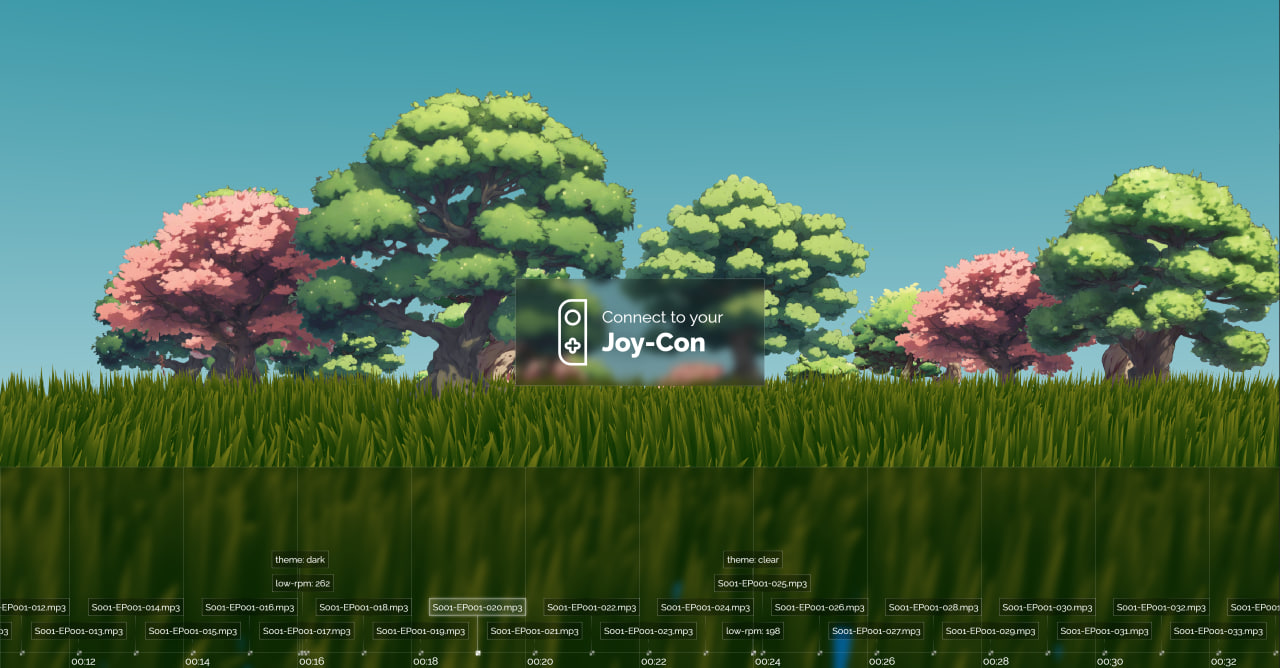
Previously wanted to create a story editor allowing any trainer to design their own stories and training programs, but considering this development cost was too high, shouldn't act rashly without seeing real demand. So temporarily made this "half-set" debugging tool for personal use, which was sufficient for now.
Stories I Couldn't Write
Day 27 ~ Day 39: Had gastroenteritis, was essentially non-functional for 3-4 days. Remaining time spent struggling with scripts and creating character monologue voice-overs.
Script Writing
Writing differs from coding in that code can be written well or poorly, but scripts either get written or they don't. Even with ChatGPT, Claude, various large models, if you can't think clearly about what you want, models are still useless. Creation remains an art requiring deep thought and continuous exploration.
GPT's role in script creation was more as an inspiration tool, helping me untangle threads in my mind bit by bit. But honestly, when finally writing, I still had to write word by word myself.
Model-wise, I always felt Claude had higher humanities literacy than GPT-4o.
GPT-4o is a powerful large language model that could help me piece together information and analyze patterns, but couldn't distill core information I wanted related to literary creation.
Differently, Claude gave me more inspiration, helping me understand general script direction and missing capabilities. Even writing mid-to-late sections, when I didn't know what I was writing or what background knowledge I lacked that made writing so difficult, Claude provided much inspiration.
Below is Claude's analysis of existing scripts:
These monologues depict a vast, mysterious, anxious prairie world through a character called "Alice's" perspective. Each monologue shares common characteristics:
- Repeatedly appearing "Alice, run fast" voices create urgency and unknown threats.
- Doubt about the real world and confusion about self-identity - characters have no clue who they are, why they're here, what they're escaping.
- Contemplation and exploration of philosophical propositions like life essence, life meaning, religious beliefs.
- Occasional appearance of items (photos, cards, pendants, knives) hinting at clues that quickly disappear.
- Dramatic environmental changes (flames, thunderstorms, withered grass) add mystery and insecurity.
- Questioning and imagining kinship, friendship, humanity, trying to find answers.
- Ending sections repeatedly mention "endless running" and "curses," suggesting endless cycles.
If an author wanted to imitate this writing style, they'd need these capabilities:
- Using imaginative, poetic metaphorical language to describe scenes.
- Having personal thoughts and insights on philosophical propositions and life meaning.
- Describing environmental details with symbolic meaning, creating mysterious, unsettling atmospheres.
- Having personal understanding and experience of humanity and interpersonal relationships.
- Skillfully using suspense and repetition to create cyclical feelings.
- Possessing certain literary cultivation and writing skills, using appropriate rhetorical techniques.
Overall, these monologues have heavy existentialist coloring, philosophical yet imaginative, providing dreamlike reading experiences. Imitating this style isn't easy - requires considerable literary talent and intellectual depth.
"Not knowing what you don't know" is always the most terrifying state and source of pain. During script creation, I fell into this predicament myself, unable to accurately express information I wanted to convey.
So initial exploration involved: I'd write an opening, then have GPT output dozens of possible continuations, finding possible directions from them, then cutting, correcting, supplementing. Then feeding back to GPT for continued writing.
Through this interaction, script creation direction gradually clarified. Although current script quality remains unsatisfactory, at least several models taking turns gave me many improvement ideas. If there's opportunity to rewrite scripts later, quality will definitely be better than now (laugh).
Character Monologue Creation
Although script drafts used my native language, actual system implementation used Japanese. Reasons are hard to express clearly in words - just felt this script structure combined with "liminal space" style scenes created content states only suitable for Japanese voice-over.
Atmospheric references came from this season's new anime Wind Breaker and Delicious in Dungeon. They had several pure character monologue segments matching my ideal atmosphere creation.
I must admit I completely don't understand Japanese. Without GPT translation, this creative need would be absolutely impossible. As for judging translation quality, I could only feed output text to Google Translate, have it read aloud, then judge by "linguistic intuition." I admit this is demanding but lacking capability, but final results were acceptable.
All character monologue creation used ElevenLabs. Personal experience: avoid using ElevenLabs for Japanese content if possible.
ElevenLabs' multilingual model can't manually specify language - relies entirely on model judgment. But Japanese text contains certain percentages of Chinese characters. The same Chinese character has different pronunciations across Chinese, Japanese, and Korean languages despite sharing the same text encoding.
In this situation, if a multilingual voice synthesis model's contextual awareness isn't strong, misreading occurs. If Chinese characters are among kana, they might be read Japanese-Chinese style. If text begins with Chinese, entire text reading might collapse - not only misreading initial characters but also scrambling subsequent content because models can't figure out what they're reading.
Obviously, if sentences begin with "昔々" (mukashi mukashi), "日々" (hibi), "人々" (hitobito), success rates are almost lottery-like (nearly impossible).
Then I didn't know how to handle this, could only constantly retry, finally finding barely usable versions.
However, after going through everything once, effects remained unsatisfactory. After long research, discovered converting all Chinese characters to kana before voice generation improved effects significantly. Of course, this depends on luck - sometimes converting entire text to kana makes effects worse. Sometimes converting just initial characters works better.
Another problem: if passages are too long without punctuation, ElevenLabs might not break sentences correctly. Therefore, attention needed - must add periods and commas to control speech rhythm for barely usable generated speech.
This sentence breaking design was also handled by GPT-4o. My prompt was:
This Japanese sentence is too long and awkward to read. Please try to simply segment it by adding punctuation to fix this problem.
Of course, some situations resist all adjustments - then only synonymous sentence rewriting works, which is very torturous.
Another experience: ElevenLabs voice generation effects are also very random. For some voices, inputting Japanese produces speech between French and Japanese, like foreigners speaking Japanese.
Wasted much time on such problems, finally finding only one usable, satisfactory voice. Therefore, I later decided against multi-character voice-overs - prioritize getting basic content online first, consider multi-character voice-overs later, or this mud-slinging battle would never end...
Voice-over Management
Because audio and script numbering needed alignment with Chinese, English, Japanese texts. Without alignment, subsequent arrangement programming and event writing would become very painful. Finding management tools became important. Although I tried many tools that partially solved problems, overall experience remained unsatisfactory.
To solve this, I thought I might need software with spreadsheet capabilities plus multimedia management functions. When errors occurred, I could quickly find problematic files in tables rather than blindly guessing which files had errors, listening one by one for debugging - terrible experience.
I tried Excel, but its cells can't insert media files. Word wasn't good for this either. Previous scripts were written in Word - basic management functions worked, but inserting audio files felt like creating mini-games in PDFs - absurd and invisible.
Later tried Microsoft Loops, but its tables also couldn't insert media files. Multi-dimensional tables worked; Feishu's multi-dimensional tables and Feishu documents also worked, but I was unwilling to use cloud service tools - felt very inconvenient.
Later I discovered Obsidian, software reaching completeness levels other note-taking software couldn't match, perfectly accomplishing what I needed.
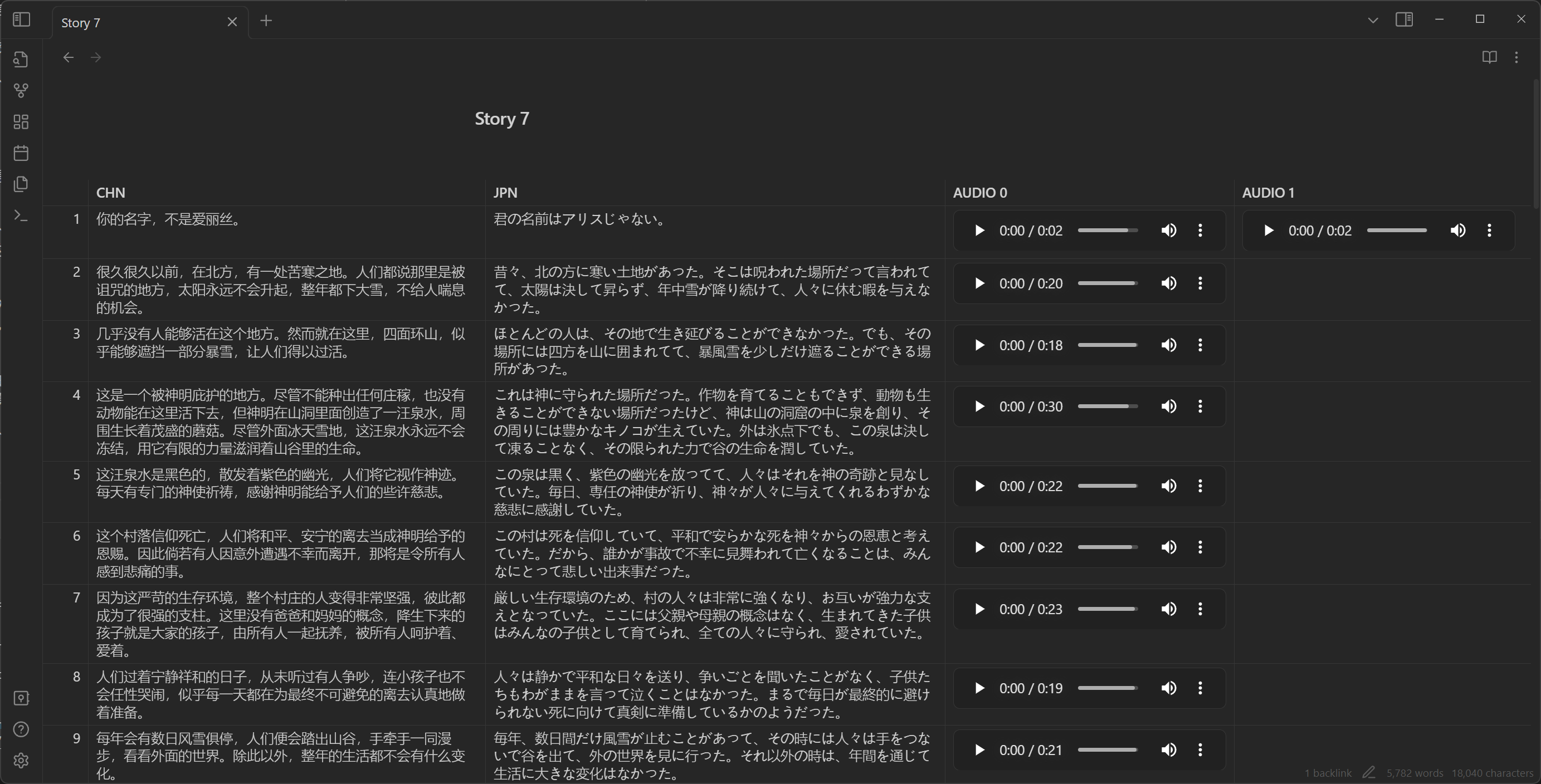
Voice-over management mainly used several plugins:
- Minimal Theme Settings: Theme settings could make tables full-width, fitting four columns of content.
- Iconize: Add icons to files for easy identification of desired documents at a glance.
- Advanced Tables: Table management - manually managing Markdown tables was truly painful. This plugin at least made row/column adjustments less blind, quite convenient.
- File Hider: Since text files were all embedded in documents, document libraries got many audio files. Hiding them looked cleaner.
- Folder Note: For adding description files to folders.
Documentation and Final Reports
Documentation Writing
Document libraries mainly contained several GPT-written documents for organizing important setting information. These documents continuously organized as scripts formed. In other words, initially I had no idea how to do this - grabbed a feeling, fed my mental intentions to GPT, had GPT output several possible directions, then made adjustments and selections.
Everything originated from my question to Sweet Old: "ˊ_>ˋ Excuse me, are there suitable stories for this kind of scene - an infinite running motion (game) program where stories emerge while running?"
Sweet Old: "You got me stumped. Feels like tabletop RPG could work? Literal running RPG - like one hundred steps trigger one story segment, then throw dice every hundred steps, Dragon & Dungeons style, make one up."
Following this feeling, plus some original settings I provided (like Alice, prairie, amnesia, infinite running, someone urging to run fast, etc.), GPT produced this setting document:
Title: "ALICE RUN!"
Overview: In this TRPG script, players will portray Alice, a little girl running on endless prairies. Sunny, birds singing, flowers fragrant, but Alice's heart fills with unease. Whenever she slows down, she hears a voice in her ear: "Alice! Run!!" This voice is both familiar and strange, seemingly carrying urgent warnings. Alice doesn't know what she's escaping or this voice's source. Players need to help Alice uncover truth while staying alert, because every corner of the prairie might hide unknown secrets.
Setting:
- Time: Unknown
- Location: A vast prairie with no buildings or obvious landmarks around.
- Character: Alice, a seemingly 10-year-old girl wearing simple dress, barefoot, long hair flowing in wind.
Rules:
- Players portray Alice, only making dice checks when Game Master specifies.
- Alice's actions described by players, but Game Master provides environmental feedback based on situations.
- When Alice stops running, players need "will" checks to decide if they can resist stopping temptation.
- If players choose to explore specific locations or items, might need "observation" checks.
Plot Summary:
- Initially, Alice runs on prairie. She doesn't remember why she's here or where destination is.
- Players can choose to have Alice explore surroundings or continue running. Regardless of action chosen, she occasionally hears that voice.
- When Alice explores, she might discover clues:
- A worn cloth doll that seems familiar.
- A string of footprints that appear to be adult-sized.
- A lonely big tree in distance with something glinting underneath.
- As time passes, weather slowly changes, sunlight gradually obscured by clouds, prairie atmosphere becomes oppressive.
- Alice will face choices: continue exploring prairie secrets or try finding way home.
- At some point, Alice encounters a mysterious old woman who seems to know something, but her information is vague. Alice needs to obtain clues through dialogue.
- Finally, Alice will uncover prairie secrets. This secret could be sci-fi elements like prairie being simulated reality; psychological elements like Alice's dreams or psychological projections; or magical elements like prairie being cursed place with Alice as the only key to breaking the curse.
Endings:
- If Alice uncovers prairie secrets and finds escape method, game ends with her safely returning to real world.
- If Alice fails to escape, she might be forever trapped by prairie or forced to face more terrifying truths.
This script's key is maintaining suspense and mystery, letting players feel both beautiful and dangerous prairie atmosphere during exploration. Game Masters should flexibly guide plot based on player choices, ensuring game experience is both tense and exciting.
Sweet Old: "Pretty... pretty awesome"
I agreed.
Later, as scripts developed, to extract patterns, I successively used large language models to write Writing Style Guidelines, Character Development Analysis, Imitation Suggestions - some with Claude, some with GPT.
Finally used GPT to go through all existing documents, wrote document guides, and the entire document library was established. Actually I wrote very few words myself, but everything I wanted was there. As documents increased, script creation ideas became increasingly clear. Compared to earlier stories, the last two stories obviously improved in quality. This feeling of being "backed up" by magical modern magic was very mystical.
Final Report
The final report is what you're reading now. From the beginning, I thought: me, an ADHD patient who never got full marks on high school solid geometry, being able to complete such work through various contemporary technologies was a very unique experience. So I should write an article recording every detail of this process.
So my electronic diary during that period all became Alice Run progress reports.
First, introducing electronic diary (or electronic rambling): in my Telegram channel, I record voice diaries weekly about daily events. Short ones 5-6 minutes, long ones 30-40 minutes. No scripts throughout, saying whatever comes to mind while walking to/from work.
Honestly, daily text volume could be enormous. If I really had to write diaries stroke by stroke, I couldn't record so much content. So voice diaries were a good format.
Later, to form systematic text records (mainly for searchability), I used whisper.cpp for speech-to-text, then used GPT to remove verbal tics and archive in Obsidian. Results looked like this:

When actually writing final reports, I just extracted existing text for another distillation, keeping core content - very convenient.
Conclusion
Actually, Alice Run is a weird project. If we remove all story elements above, the project's core is just a training program where "trainers step, screen characters follow," with "some statistical functions." Not even many training traces. But for me personally, this project has great significance - it proves how new generation "AI"-based technology improves world inclusivity.
A reader who doesn't understand Japanese can read entire Japanese books with large language model help, completing Japanese script writing; a developer ignorant of industrial signal processing can design complete step detection algorithms under large language model guidance; a math idiot who barely passed high school math can write seemingly competent simple computer graphics code; even in refactoring existing projects, bug fixing, performance tuning - in all aspects, large language models help; a person who can't do digital art can use Stable Diffusion to create many mature texture materials; even if not good at writing, large language models can patiently guide you step by step to complete independent works, helping organize materials, write documentation and reports.
For an "impatient" ADHD patient, ten years ago, any of these steps could have killed my creative enthusiasm. But today, just over a month allows a pure beginner to complete seemingly competent work.
Formerly, qualified developers needed core abilities including: language ability, logic, and number theory. Although different development fields required different degrees of these three, if any was weak, career ceiling became extremely low.
The current picture I see is security of "having shortcomings covered, being able to freely act on ideas." We're approaching a world where "anyone can do anything." When I was in high school, I was thrilled by Node Webkit's emergence because for developing "usable" desktop programs, those "profound, abstruse" development knowledge became optional to some extent. A decade later, this door is being further lowered. Currently, the biggest threshold might only be: thinking clearly about what you actually need, imagining what your ideal product looks like - precise, appropriate expression.1
Returning to the project itself, why I made such a project. The core humanistic ideal was also hoping to achieve a world where "anyone can do anything," providing new choices. Mentioning weight loss and exercise, most people might think of going out, outdoor sports, sweating profusely, wildly spending sunshine and youth. But these stereotypical imaginations block many introverted people or those without sufficient physical fitness.
Taking myself as an example, I get sick three times every two months on average. Every time I want to restore exercise habits, I become a dead person lying in bed within days.
For those who can't fit into "stereotypical impressions," I hope to provide another gentler choice, hoping everyone can freely explore this world at their own pace.
Oh right, I forgot to post the project address.
Project URL: https://alice.is.not.ci
Source code: https://github.com/losses/aliceRun
Above is this project report. Hope you enjoy the article.
But some underlying work still can't be entirely bulldozed through with large language models. The more complex logical chains tasks have, the less large language models can handle - this point is unlikely to change in the foreseeable future.